

Quick Summary
When snapshot replication is configured with schema replication enabled, DDL changes are sometimes marked for replication but never marked for truncation, creating a false “undistributed command” that prevents log truncation and causes uncontrolled growth. The solution was to add a log reader agent using sp_addlogreader_agent on the publisher to mark all replicated commands for truncation.
Context
 The SQL Server client environment this issue occurred in is an Azure IaaS environment hosting an application used by their regulatory affairs department. The primary transactional database is configured with snapshot replication to a secondary node that is used to offload their reporting workload, with nightly snapshots being performed to keep the reporting data up to date. In this case, the transaction log issue did not interrupt reporting before we resolved the issue, but if the transaction log had run out of room to grow, it would have impacted the live transactional database as well as reporting.
The Problem
The first and main indication of this problem was that the transaction log file of the database had grown to be about 4x the size of the data file, which is abnormal in almost all circumstances and led us to investigate and uncover that the transaction log was not being truncated at regular checkpoint intervals (because the database is in Simple Recovery model). No errors occurred, but the abnormal behavior was us to investigate immediately, before the log had the opportunity to fill up the disk it was located on.
The Investigation
We began our investigation by querying the “log_reuse_wait_desc” column in the sys.databases table to find the reason for the log not truncating. This revealed the cause to be “REPLICATION”.
We also executed DBCC OPENTRAN() in the publisher database, which revealed an undistributed transaction that was preventing the log from truncating.
“Replicated Transaction Information:
Oldest distributed LSN : (0:0:0)
Oldest non-distributed LSN : (43831:51:1)
DBCC execution completed. If DBCC printed error messages, contact your system administrator.”
Our next move was to open Replication Monitor; however, the nightly snapshots showed no issues and had been occurring successfully every night without issue, and no other errors presented themselves.
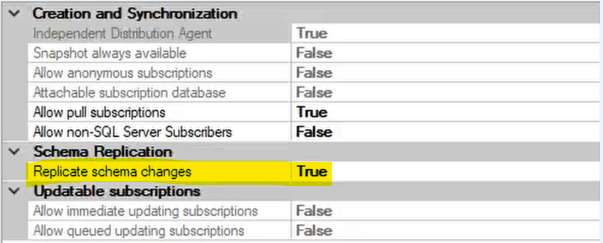
With the latest nightly snapshot having completed successfully, and no other errors being present, an undistributed transaction didn’t seem to make any sense. At this point, we had to break out our favorite tool – the internet – to try to determine what was happening. Our research revealed that there appears to be a known, but little-documented, bug in SQL Server (since 2005) in which DLL changes on tables with Schema Replication enabled are marked for replication but never marked for truncation after the changes have been propagated. This results in a false “undistributed command” on the publisher that prevents the transaction log from truncating.
The Fix
The least-invasive solution for the immediate issue and to prevent it from re-occurring is to add a log reader agent to the publisher using sp_addlogreader_agent, even though you’re using snapshot replication (where it normally isn’t needed). The log reader agent will identify those false “undistributed” DDL commands and mark them for truncation, preventing future occurrences. The other possible, but less ideal, solutions would be to:
- Disable Schema Replication for the publication. This of course won’t work if you require Schema Replication for your use-case.
- Use “sp_repldone” to mark the specific transaction(s) in question as distributed or skipped. This is less ideal because it doesn’t guarantee the issue won’t happen again, and you are leaving yourself open to inconsistencies on the subscriber if you make a mistake while using the sp_repldone command.
The Lesson
Monitor your transaction log size relative to your data file size! While we never advise anyone to utilize auto-shrink in their databases, or to do any sort of shrink operation without clear reasons to do so, keeping an eye on the size of your log files relative to your data file sizes can help you identify issues involving transactions being unintentionally left open by your application or users, or replication as we saw here, and resolve them before they cause business interruptions.
The Straight Path Team and Skills
Jordan Boich, our in-house replication guru, was instrumental in resolving this issue for the client. His knowledge of the ins-and-outs of Snapshot Replication allowed us to quickly collect all the details that we needed to implement a solution which kept the customer from experiencing any business interruption.