

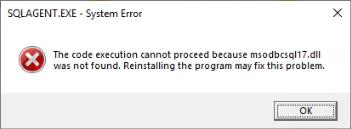
We started receiving alerts that a client’s SQL Server Agent was not running. Upon further investigation, we found that the server was recently restarted after Windows updates were applied. While reviewing the installed updates, we encountered an issue with KB5071547 on Windows Server 2022. After some troubleshooting, which included trying to start the agent from the command line, we were presented with the following error:
The client here was running Windows Server 2022 Datacenter edition with SQL Server 2022 installed. The environment is hosted on a private cloud by a third-party provider and is virtualized.
The Investigation and Fix
We started receiving alerts shortly after the server was patched and the OS was back online. The SQL Server Agent service was reported as offline in our Daily Check reports, which we send to our support team and all clients. We consider this a P1 until proven otherwise, so our team jumped on that ticket first thing Monday morning. This server is a M-F 9-5 department-use server, so no calls were made to our on-call 24/7 number that weenedn for support, since no one at the client was aware of it.
We began troubleshooting by trying the simplest step first: restarting the agent. After the agent failed to start, we reviewed the server’s event logs and SQL Logs to see whether anything was reported that could help us determine why the agent wouldn’t start. The SQL Agent output log wasn’t updating, and the SQL Server error log wasn’t recording anything either. Looking through the Windows Server logs, we saw the agent failed to start, but the only reported issue was a timeout while waiting for the agent to start.

In the interest of seeing if we’d get additional information, we tried to start the SQL Agent from the command line:

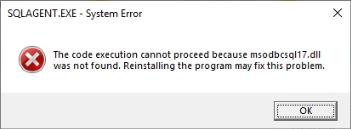
It was then that we received the message that the ODBC driver was not found.
We then decided to review the recent updates to determine whether there is a known issue and a proposed solution. 
When searching for “KB5071547 SQL Agent not starting,” the first MSFT article recommended reinstalling the driver. They aren’t 100% sure the KB is related or at least the direct cause, but if someone else experienced the same issue and reinstalling the driver resolved it, it is possible the two are related.
Lesson/Takeaway
Sometimes, the problems we face require multiple teams and log analysis to troubleshoot and identify the root cause. It is important to always start with the basics to gain a clear understanding of where to look next. It would have been easy to just assume this was another problem with an AV tool blocking the application from starting. That assumption, though, would have led us down the wrong path and diverted time and resources from other teams. Not to mention the client being down longer than necessary.
The Straight Path Team and Skills
Alyssa did some initial troubleshooting, but since this was discovered during the morning daily check routine, when our support team is busy with the hand review and human-touch look at all daily checks, I took over to do a deeper dive and determine whether we needed to involve more people. Once I was connected, I resolved the issue relatively quickly using core troubleshooting skills, and knowledge of how SQL Server starts was critical to reaching a solution.