

Summary of tempdb data file issue
It’s important to keep the data files in tempdb equally sized, because SQL Server’s internal algorithm wants to use tempdb files that have the most space. Equal sizes help you get equal distribution across all files, reducing the likelihood of contention on a single file.
Context: Mismatched tempdb data file sizes
While reviewing the configuration of a client’s SQL Server instance recently, I noticed that they had a very curious tempdb configuration. Although it had multiple files for the eight CPU cores as Microsoft recommends for tempdb configuration, it also had another MUCH larger file with a MUCH larger growth rate.
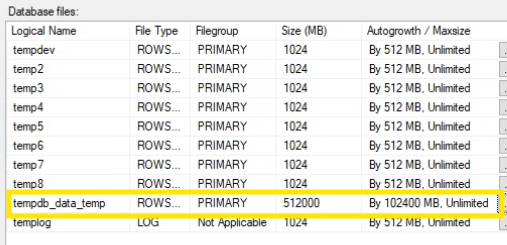
Not sure who put that there, but they were probably panicking from a query that was using a lot of tempdb. The files currently had very little any usage, but for future performance I needed to remove that large “tempdb_data_temp” file.
Investigation
I tried to empty the file so it could be dropped, using some of the methods I outlined in a post years ago about reducing the size of tempdb data files. But unfortunately, most of the large tempdb file was in use, because it had the most space. So, it couldn’t be emptied and dropped.
The next step was to try Andy Mallon’s method for removing an extra tempdb file. This involves creating a SQL Agent job with a schedule to run on startup, so that on startup, it will run something like this.
USE [master];

GO

ALTER DATABASE [tempdb] REMOVE FILE [tempdb_data_temp];

GO
It’s a nifty method that I’ve used in the past, but this time when I restarted the instance it didn’t remove the file. Why? Because when starting up SQL Server uses some amount of tempdb. Typically, this would be in the primary file (“tempdev” for this instance), but because the size of “tempdb_data_temp” was so much larger, it appears it was creating objects there instead.
The fix: Cleaning up the tempdb file mismatch and making things good
In order to remove the file at startup, I first needed to resize the file to something smaller than the other data files. Since the instance had just restarted and there was hardly any tempdb usage, I executed the following command to resize the file to 1 MB.
USE [master]

GO

ALTER DATABASE [tempdb] MODIFY FILE ( NAME = N'tempdb_data_temp', SIZE = 1024KB )

GO
The file still had some objects, so it couldn’t be dropped now. However, the size was smaller, so that the method of dropping the file at restart should work. Sure enough, after another restart the file was successfully dropped. Interestingly, if you want to use this method yourself, Andy’s code also includes instructions on how to have the job drop itself after a restart. Just make sure you aren’t trying to drop a file larger than the other data files.
Check Your Own tempdb
This is one of the things we look for when we review our clients’ SQL Server tempdb setup or help troubleshoot performance using our sp_CheckTempdb script, it’s a free community tool to help folks investigate and troubleshoot issues with their own tempdb setup.