

This week’s case of the week post comes from Jack Corbett.
Quick Summary
When attempting to use Copy-DBACredential in dbatools, I received the error “The parameter is incorrect,” yet other commands connecting to the same servers worked.
Context
I was working with a client to do an upgrade/migration from SQL Server 2016 to SQL Server 2022, and this client assigns non-default ports to SQL Server. As part of the process, I had to create a credential on one node and needed it on the other node, so I went to the handy Copy-DBACredential dbatools cmdlet, but it didn’t work.
The Problem
Couldn’t copy the credential using Copy-DBACredential because it couldn’t connect to the source SQL Server.
The Investigation
I started by adding the -Verbose parameter to the command to see where the failure was. I saw that the failure was happening with the internal Connect-DBAInstance cmdlet.
Copy-DbaCredential -Source 'SQLInstanceA,Port' -Destination ‘SQLInstanceB,Port' -whatif -VerboseHere is the output using the -Verbose parameter that led me down the path to Connect-DBAInstance:
VERBOSE: [14:56:52][Copy-DbaCredential] We will try to open a dedicated admin connection.
VERBOSE: [14:56:52][Connect-DbaInstance] Starting loop for ‘SQLInstance,PortNumber’: ComputerName = ‘ComputerName’, InstanceName = ‘MSSQLSERVER’, IsLocalHost = ‘False’, Type = ‘Default’
VERBOSE: [14:56:52][Connect-DbaInstance] String is passed in, will build server object from instance object and other parameters, do some checks and then return the server object
VERBOSE: [14:56:52][Connect-DbaInstance] authentication method is ‘local integrated’
WARNING: [14:57:07][Copy-DbaCredential] Failure | The parameter is incorrect
As usual, a super helpful error message…
My first thought was that because the Remote Dedicated Administration Connection (DAC) was not enabled on the servers, Connect-DBAInstance was failing while trying the DAC connection. Copy-DBACredential uses the DAC to get everything it needs to copy a credential. There are a few other Copy-DBA* cmdlets that require the DAC as well, but I can’t name them all. So, I enabled the Remote DAC on the servers, but I still got the error message.
The next step in troubleshooting was to attempt to connect using the DAC in SSMS, which you do by adding “ADMIN:” to the front of the SQL Instance in the Server Name box. I tried that and got the same error:
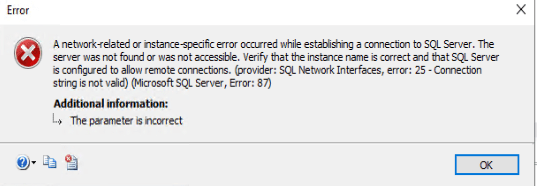
I really was hoping a better error message would be better, but I was wrong.
The Fix
Eventually, my brain started working again, and I realized that the Remote DAC endpoint does not listen on the same port as the standard SQL TCP endpoint, so by supplying the port as part of the Server Name and using the Remote DAC, I was supplying bad information. So instead of this:
connect-dbainstance -SQLInstance 'SQLInstance,Port' -DedicatedAdminConnection -TrustServerCertificate -VerboseI just needed this:
connect-dbainstance -SQLInstance 'SQLInstance -DedicatedAdminConnection -TrustServerCertificate -VerboseAnd voila! Connection made!
Lesson/Takeaway
Don’t take simple things for granted.