

You get an alert that there are one or more databases in a “Recovery Pending” state. This means the database started but could not complete the recovery pending process for some unknown reason. It is stuck in this state and unusable until recovery can be completed.
The Investigation
After receiving the alert, I verified that there were multiple databases on the same instance that were in the “Recovery Pending” state. A review of the SQL Server error log showed that the folder on the L drive was inaccessible, so transaction log files could not be read.
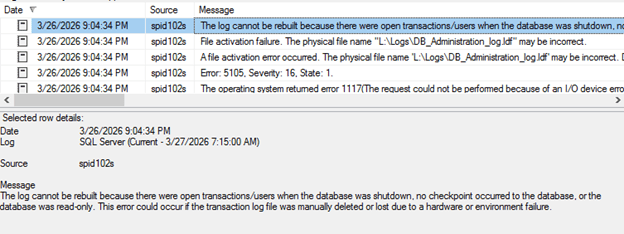
Those errors were not current though, and the L drive now appeared to be accessible. Moreover, it did not appear to be out of space (which could have been a possible root cause of the error.)
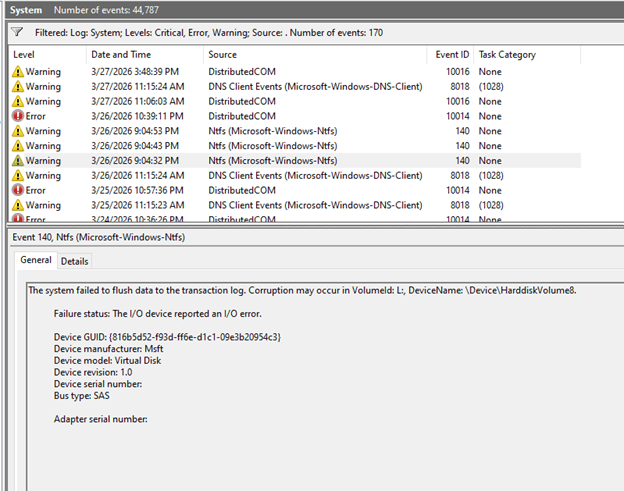
Reviewing the Windows System error log on the server showed there was a storage level issue for that drive only at the time of the errors in the SQL Server error log, and that those errors were no longer persisting.
The Fix
Often times a database is in the “Recovery Pending” state because there is corruption in the transaction log file. In that case, the database may need to be set to EMERGENCY state, set to SINGLE_USER, and then have DBCC CHECKDB run with REPAIR_ALLOW_DATA_LOSS. As with most situations involving corruption, you’re better off restoring from a backup then trying the “database surgery” method, since you never know how much the data will be lost with the former method.
Fortunately, this was not an issue of corruption, but rather one of the drive with the transaction log files being temporarily unavailable. Since the drive was now available, the databases could be brought online by simply taking them offline, then bringing them online.
ALTER DATABASE [DatabaseName] SET OFFLINE;
GO
ALTER DATABASE [DatabaseName] SET ONLINE;
GO
Since the transaction log files were now readable, the online process was able to successfully complete recovery.
As a side note, since these databases were in a state where there could be no connections we didn’t need to ROLLBACK IMMEDIATE to account for any activity.
One final step was needed, though. Although we did not suspect that the “Pending Recovery” state was due to corruption, we still ran DBCC CHECKDB for each database to verify there were no consistency errors.
The Takeaway
Finding one or more databases in the unusable “Recovery Pending” status can be shocking, but the solution may be shockingly simple.
- Check the SQL Server and Windows error logs. In this case we were able to quickly identify that the cause was a temporary and not persistent storage level error. Since it the issue only affected some but not all databases, we had hope the quick fix noted above would work.
- Try the solution of least resistance first. Someone with less experience might have tried to solve this by asking a search engine or AI chatbot what to do. I did a quick survey and those solutions said to go the way of repairing with data loss. That should be a last resort, and maybe not even a necessary option if you…
- Always have a backup. Backups are the most important thing you can have for your databases. For “oops” moments, for ransomware, for corrupted data files, and for times like this. If our method had not worked, we still verified that recent backups were available if needed.
- You still need an integrity check. Any time you have a database recovered from an unusual state, you should always run an integrity check. It’s better to know now if you have an issue that requires a database to be restored from backup.
Seriously, go check your backups now. We even have a tool to help you check SQL Server database backups quickly.
The Straight Path Team and Skills
Andrew Kelly and I collaborated on troubleshooting this issue. All thanks to him for suggesting this simple fix in this case.
Troubleshooting like this is a team effort, and having multiple perspectives and experience with the problem helped us come to a solution in just a few minutes.
This post is part of our Case of the Week series—real SQL Server issues and lessons from the field.
If you are inheriting SQL Server environments and want a team that knows how to dig into the details, reach out to us, and let’s talk about managing your SQL Server environment together. Our team is 20 people deep, and we have MVPs, speakers, bloggers, and authors. We know a lot because we’ve been exposed to a lot.