

Summary – Repeated Login Failures in SQL Server
At Straight Path, we regularly inherit SQL Server environments after someone else completes the initial install. Most of the time the server configuration just needs a tweak or two and everything is good to go. Other times, we encounter odd behavior that sends us down a research rabbit hole. Recently, we ran into repetitive login failure messages in the SQL Server error log coming from the local computer account:
Login failed for user ‘domain\computer_name$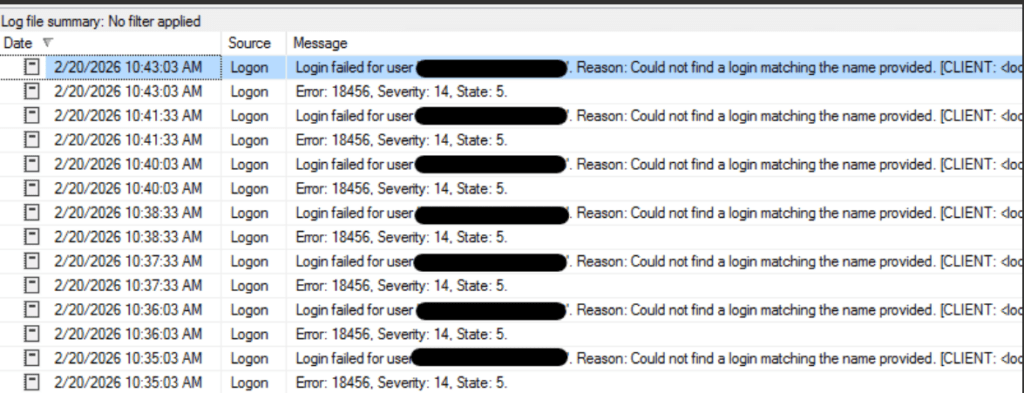
After we rounded up the usual suspects (SSRS scheduled reports, SQL Agent jobs doing something they shouldn’t, etc), Sandra and I tracked the root cause to a pair of SSIS services that we were pretty sure weren’t even in use by the client anyway. Turning those services off stopped the messages.
Context
The SQL Servers where we encountered these errors were both running SQL Server 2022. One was an on-premises server, and the other was hosted in AWS. These login failure messages were not causing a functional problem for the client, but they were cluttering up the error log in a serious way. If you have ever tried to troubleshoot an issue by reviewing the SQL Server error log and had to wade through thousands of irrelevant entries, you know how quickly that becomes a nightmare.
These failures were discovered while reviewing the SQL Server error log as part of our standard best practice review when we take on responsibility for a new server. This is one of the reasons we always go through the error log when we inherit an environment. You never know what is quietly happening in the background until you look.
The Investigation and Fix
We started with the most common explanations. We checked the SQL Server service accounts to verify they were configured as domain accounts. We ran a trace to monitor the failed login events and see if we could gather any additional detail about the connection being attempted (we could have used an extended event for the same thing also, of course.) Nothing turned up. None of our SQL-side troubleshooting was giving us anything to work with, so we shifted our focus to things outside of the SQL Server engine itself.
After some research and ruling out other services like SSRS scheduled reports and SQL Agent jobs, we started to look at SSIS. While investigating the different components of SSIS, we noticed two services that we were confident were not in use by either client: the SSIS Scale Out Master and the SSIS Scale Out Worker.

SSIS Scale Out is a feature introduced in SQL Server 2017 that allows you to distribute SSIS package execution across multiple machines. The Scale Out Master manages the workload and the Scale Out Worker checks in periodically to see if there are packages to run. It is a useful feature when you need it, but in these environments, nobody had configured or was using it.
After confirming with both clients that these services were not in use, we stopped them. The login failure messages stopped immediately.
Root Cause
The Scale Out Worker process was checking in periodically with SQL Server to see if it had any work to do. Since the feature was never configured, the worker did not have a valid login context, and each check-in attempt resulted in a login failure message written to the SQL Server error log. It was like an employee showing up to a building every few minutes, trying to badge in with a card that was never activated, and setting off the alarm every single time.
Key Takeaways
When you take responsibility for a SQL Server that someone else built, it is good practice to review the services running on the machine and verify that everything that is running actually needs to be running. In this case, two services were enabled that were not being used by the client. They were not causing a production issue at the time, but the noise they were generating in the error log would have made future troubleshooting far more difficult than it needed to be.
This is also a good reminder that not every error log message that looks like a security concern actually is one. These login failures could easily be mistaken for unauthorized access attempts if you were not familiar with the SSIS Scale Out feature. Understanding what is installed and what is running on your SQL Server helps you separate real problems from background noise.
In this day and age? Once you start ignoring “acceptable” login failures, you’re going to miss the bad actors doing damage.
The Straight Path Team and Skills
Sandra Delany and I collaborated on this issue, combining our knowledge of SQL Server, SSRS, and SSIS to work through the different layers of the platform and identify the root cause.
Troubleshooting like this is a team effort, and having multiple perspectives on the problem helped us move from “we have no idea where this is coming from” to a solution much faster than either of us would have on our own.
This post is part of our Case of the Week series—real SQL Server issues and lessons from the field.
If you are inheriting SQL Server environments and want a team that knows how to dig into the details, reach out to us, and let’s talk about managing your SQL Server environment together. Our team is 20 people deep, and we have MVPs, speakers, bloggers, and authors. We know a lot because we’ve been exposed to a lot.