

Quick summary
If you have ever done an in-place upgrade of SQL Server, the master database probably has a lower compatibility level than the other system databases.
Context
We were attempting to install a troubleshooting stored procedure in the master database of a SQL Server 2016 instance when we received the following error.
Msg 195, Level 15, State 10, Procedure sp_ShootTheTrouble, Line 227 [Batch Start Line 7]
‘TRY_CONVERT’ is not a recognized built-in function name.
This was unexpected, as TRY_CONVERT has been a command since SQL Server 2012. As a consequence, we were unable to install the stored procedure.
The Investigation
We did a quick check of the compatibility level of the master database using this query.
SELECT [name], compatibility_level
FROM sys.databases
WHERE name = 'master';
The results of the query indicated that the master database was set to compatibility level 100, which is SQL Server 2008.
A quick check of the Microsoft SQL Server folder showed this instance had experienced several in-place upgrades, but was likely to have originally been SQL Server 2008 R2, as indicated by the folder “MSSQL_10_50.MSSQLSERVER”.
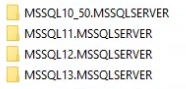
One thing many folks don’t realize is that the master database retains the compatibility level it had before the upgrade if you upgrade SQL Server in-place. All other system databases (tempdb, model, msdb, and Resource) will upgrade to the compatibility level of the new version, although user database maintain the compatibility level of the database if it is a supported level.
So, for this instance, despite multiple in-place upgrades, the master database still retained the compatibility level of the original installation of SQL Server 2008 R2.
The fix – manually change the compatibility level
There is usually little to no risk in manually raising the compatibility level of the master database in this case. The biggest consideration would be for any stored procedures or other objects with dependencies on features or commands that have been removed in the current version.
There were no other user objects, so we ran this to bring the compatibility level of the master database to that of the version.
USE [master];
GO
ALTER DATABASE [master] SET COMPATIBILITY_LEVEL = 130;
GO
The Straight Path Team and Skills
This case shows one of many reasons why in-place SQL Server upgrades are problematic and generally not recommended. If you are considering upgrading your version of SQL Server, the Straight Path team can help make the migration as painless and cost-effective as possible.
Straight Path Solutions is a team of nearly 20 SQL Server experts trusted by 120+ clients. We treat our clients’ environments as if they were our own because our job depends on your success. Making your life pain-free in the land of SQL is the rewarding part of our work. If you’re planning a migration, dealing with backup concerns, or just want to sleep better knowing someone’s watching your environment, reach out to us.
This post is part of our Case of the Week series, real SQL Server issues and lessons from the field.